Exporting hours for your payroll consultant in Italy: what to send and how to check it
What an Italian payroll consultant needs each month for payslips and the LUL: hours, overtime, absences with codes, part-time, cut-off. Checklist and mistakes.
Published 4 min read
The payroll consultant (consulente del lavoro, the labour consultant who usually runs payroll for Italian companies) cannot see how your employees work: they see only the numbers you send. If those arrive late, in different formats or with vague absences, the payslip stalls on questions or goes out with an error. Here is what to prepare each month, how to check it before sending and which mistakes to avoid.
What the consultant needs each month
The exact list depends on the firm and the collective agreement (CCNL): agree it once, then send it the same way every time. Usually they need:
- Hours worked per employee, with the month’s total.
- Overtime separate from ordinary hours. Legislative Decree 66/2003 (art. 5, par. 5) says overtime must be counted separately. How far it must be split (day, night, holiday, hours banked) is set by the CCNL: ask your consultant. See overtime rules and time bank.
- Absences with their code: vacation, ROL, leave, sick leave, maternity, Law 104 leave, in days or hours as the case may be.
- Part-time: weekly hours and how the schedule is spread, because hours due versus hours worked are compared against that schedule, not a full-time one. See part-time work.
- New hires and leavers in the month, with dates, and any change of schedule or contract.
- The cut-off: the day the month becomes final. There is no date that fits everyone: you and the firm set it.
Why the codes matter: the LUL
The consultant often keeps the Libro Unico del Lavoro (LUL, the single employment register) too, and it is built from the same data. Art. 39 of Decree-Law 112/2008 provides an attendance calendar with the hours worked each day, overtime, absences (even unpaid), leave and rest (par. 2), to be completed by the end of the following month (par. 3). The Ministerial Decree of 9 July 2008 (art. 1, par. 2) requires a cause code for every presence or absence that is “precisely identified and unambiguous”. According to the Ministry of Labour (circular 20/2008) it is not enough to write “absence”: the specific reason is needed, for example vacation or sick leave, or leave or ROL in hours, and a legend if abbreviations are used. If a code is missing from your report, the consultant cannot guess it. For the full picture read attendance records and the LUL.
Decimal hours or hh:mm
7 hours 45 minutes is 7.75 hours, not 7.45: minutes are divided by 60. The trouble starts when both formats live in one file and 7.45 gets read as 7 hours 27 minutes. Ask your consultant which they prefer, always use that one and set a single rounding rule. To convert, use the hours to decimal converter.
Checklist before sending
- The period matches the agreed month, first to last day.
- Every employee is there, new hires included, and leavers have an end date.
- No empty days: each day has hours worked or an absence with its code.
- For each person, hours worked plus absence hours equal the hours due under their schedule.
- Overtime is separate and already approved.
- Vacation, ROL and time-bank balances match the month’s movements.
- One hours format throughout the file.
- Corrections are made before sending, not after.
Example: checking one employee
November 2026, full-timer on 8-hour days, 21 working days: 168 hours due. Invented figures, for illustration.
| Item | Hours | Note |
|---|---|---|
| Ordinary hours worked | 136 | |
| Vacation (F) | 16 | 2 days |
| ROL (R) | 8 | in hours |
| Sick leave (M) | 8 | 1 day |
| Total | 168 | matches hours due |
| Overtime | 4 | outside the sum, on its own line |
If the total were 160, 8 hours would be missing: an absence without a code or a day left blank. For totals you can use the hours worked calculator.
Mistakes to avoid
- Mixing decimals and hh:mm in the same file.
- Vague absences (“absent”, or “leave” without saying which): every code must be recognisable.
- Changing data after sending without saying so. If a figure changes, tell the consultant and resend the updated period: two versions floating around cause payslip errors.
- Balances that do not match, with ROL or vacation used on the timesheet but not in the remaining balance.
- Part-timers compared with a full-time schedule, and so flagged as anomalies.
- Forgetting new hires and leavers, or their exact dates.
How Chrono Desk does it
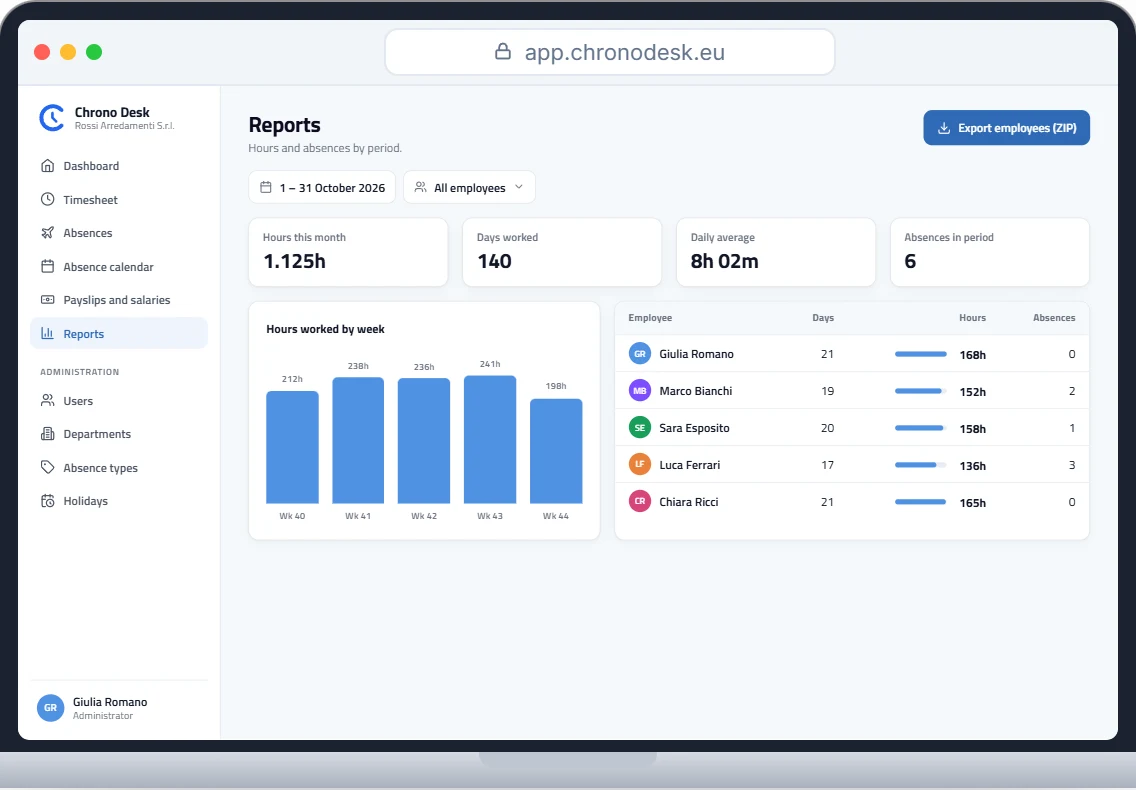
In Chrono Desk the payroll consultant has a dedicated role: they see the whole company’s hours and absences without appearing among the staff. The report shows hours worked, days and absences by period and employee, and exports to CSV, one file per employee in a single ZIP archive. The consultant reads and exports; corrections are made by the administrator, after which you simply export again.
Upstream, the timesheet calculates hours from start, end and break, and vacation and leave holds custom absence types (ROL included) with entitlement, used and remaining. The CSV is not a standard format of payroll software: ask your consultant what they need and check together that they can read it. For their side of it, see the page for payroll consultants.
Want to try it with your company’s data? Contact us.
This guide is for information only and does not replace advice from your payroll consultant or the rules of the applicable collective agreement.