
Attendance records in Italy: what the law requires
Is clocking in mandatory in Italy? What the Libro Unico del Lavoro requires, what the 2019 EU ruling means and where privacy and worker-monitoring rules apply.
Published 4 min read
“Do I have to make employees clock in?” The short answer: Italian law does not prescribe a clocking-in system, but it does require you to record hours worked and absences in the Libro Unico del Lavoro.
What the Libro Unico del Lavoro requires
The Libro Unico del Lavoro (LUL), Italy’s single employment register, was introduced by art. 39 of Decree-Law 112/2008 and applies to private employers (household employers excluded). It includes an attendance calendar showing, for each day, the hours worked by each employee.
- For employees on a fixed salary or paid by the full day, only the day of attendance is noted.
- Each month must be completed by the end of the following month.
- The implementing decree (Ministerial Decree of 9 July 2008) requires unambiguous reason codes for presence and absence and, if abbreviations are used, a legend explaining them.
- According to the Ministry of Labour’s circular 20/2008, the calendar also covers overtime, absences, vacation and rest days.
- It must be kept for five years from the last entry (art. 6 of the decree); failing to keep it is subject to a fine (art. 39, paragraph 7).
Is clocking in mandatory?
Neither art. 39 nor the decree names a tool: a time clock, badge, app or daily sheet is an organisational choice. As far as we could verify in official sources, the law does not impose a clocking-in system, only that the daily data exist and end up in the LUL. Also check the CCNL (national collective agreement) and company agreements.
The 2019 EU ruling
On 14 May 2019 the EU Court of Justice (case C‑55/18) held that Member States must require employers to set up an objective, reliable and accessible system for measuring each worker’s daily working time. It left the arrangements, including the form, to Member States, given sector and company size.
For Italy: the ruling is addressed to States and does not mention time clocks; the LUL already requires daily hours, but we found no official INL or Ministry note on which method meets the EU requirement, and readings differ. Clocking in cannot be called mandatory, nor is a file filled in at month end clearly enough: aim for a daily, verifiable record.
Digital tools and privacy
Art. 4 of the Workers’ Statute provides that:
- tools that also allow remote monitoring of work need an agreement with the unions or, failing that, authorisation from the national labour inspectorate (INL, Ispettorato nazionale del lavoro);
- this rule does not apply to tools used to do the job or to tools that record access and attendance;
- the data are usable only if workers are properly informed and privacy law is respected.
A system that records only times therefore does not need the paragraph 1 procedure; extra features such as geolocation can bring it back into scope (for GPS, INL circular 2/2016).
Biometric data. Fingerprints are a special category of data (art. 9 GDPR). In its decision of 26 February 2026, fining a cooperative 15,000 euro, the Italian data protection authority (Garante privacy) wrote that current law “does not allow” processing employees’ biometric data to record attendance (our translation). In a 2025 statement it recalled that employee consent is generally not a valid basis.
Employee access and inspections
Employees can ask for a copy of their data, clock-ins included (art. 15 GDPR), and a reply is due within one month. In 2024 the Garante fined a company 4,000 euro for not answering a request for an LUL extract and the clock-in records.
On inspections, art. 39 provides administrative fines for not keeping the LUL or showing it to inspectors, omitted or inaccurate entries and failure to retain it.
Example: one employee’s month
October 2026, full-time at 8 hours a day, 22 working days (176 scheduled hours):
- 18 days of 8 hours: 144 hours;
- 1 day of 10 hours: 8 regular and 2 overtime;
- 1 half day: 4 hours worked and 4 of leave (P);
- 1 vacation day (F) and 1 sick day (M): 8 hours each.
The summary shows 158 hours worked (156 regular, 2 overtime) and 20 of absence: 156 plus 20 is 176, so it adds up. The hours worked calculator helps with totals.
Checklist
- Actual hours recorded every day, not rebuilt at month end.
- Absences with a clear code; overtime separate from regular hours.
- LUL completed by the end of the following month and kept for five years.
- Employees informed; no biometric or location data without legal review.
Common mistakes
- Assuming a time clock is (or isn’t) required without checking the CCNL and agreements.
- “Standard” hours copied across the whole month.
- Abbreviations with no legend in the calendar.
- Monitoring features installed without agreement or notice.
How Chrono Desk does it
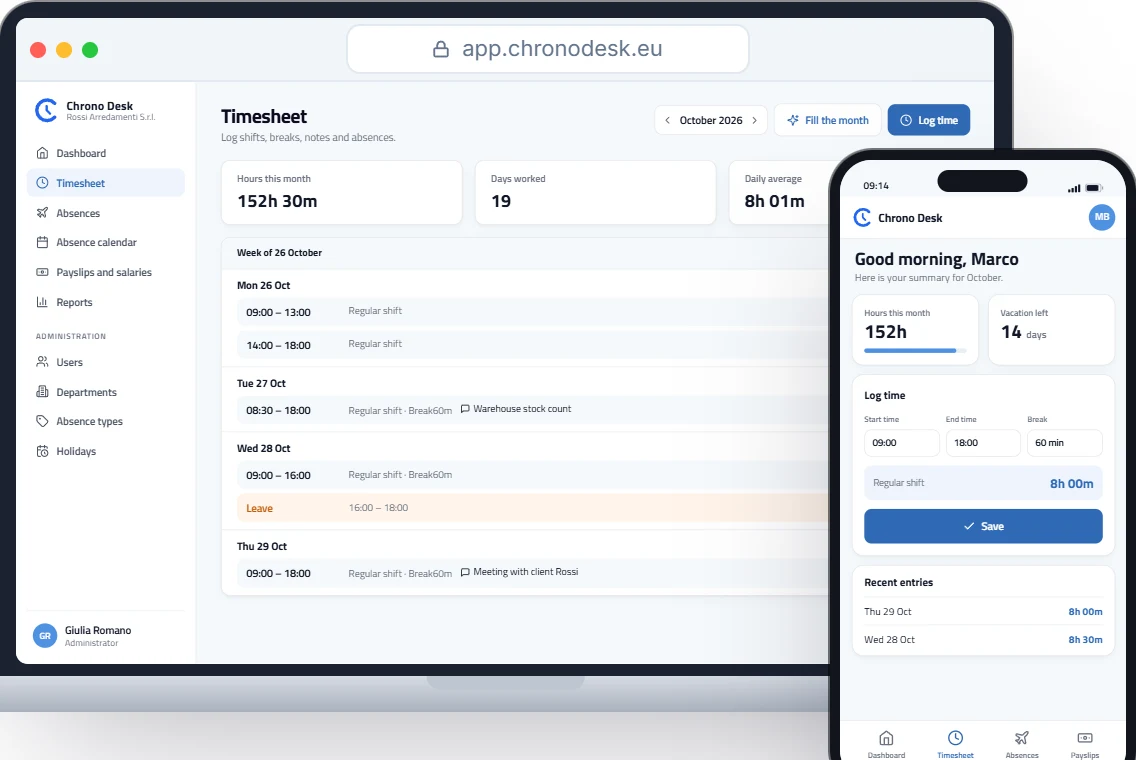
Chrono Desk helps collect and organise this data; it doesn’t replace your consultant:
- each employee logs start and end with the break, or just the total hours, and hours are calculated automatically;
- “Fill the month” fills the timesheet from the custom schedule, with vacation, leave and sick days in the same place;
- employees see only their own data, managers their team’s, administrators and the payroll consultant the company’s, and administrators can correct hours and absences;
- period reports export to CSV, one file per employee in a single ZIP.
See also our guide to employee timesheets, or request a demo.
This guide is for information only and does not replace advice from your payroll consultant or the rules of your collective agreement.